How to Log Into Your Adopterluv Account
Last updated: October 2, 2026
You do not create an Adopterluv login: your account is made for you at adoption, and you activate it from the invitation email your shelter sends.
If you have your email and password, you can log in at Pet Owner login page. Forgotten it? See how to reset your Adopterluv password.
First Time Login
If you just completed an adoption for your new pet(s), congratulations! Be on the lookout for an email from help@adopterluv.com with the subject line: Congrats on adopting! Don't miss these photos of [Pet Name]
Click the Activate My Account button to set up your password. Once your account is activated, you can log in with your email address and new password on the Adopterluv sign-in page.
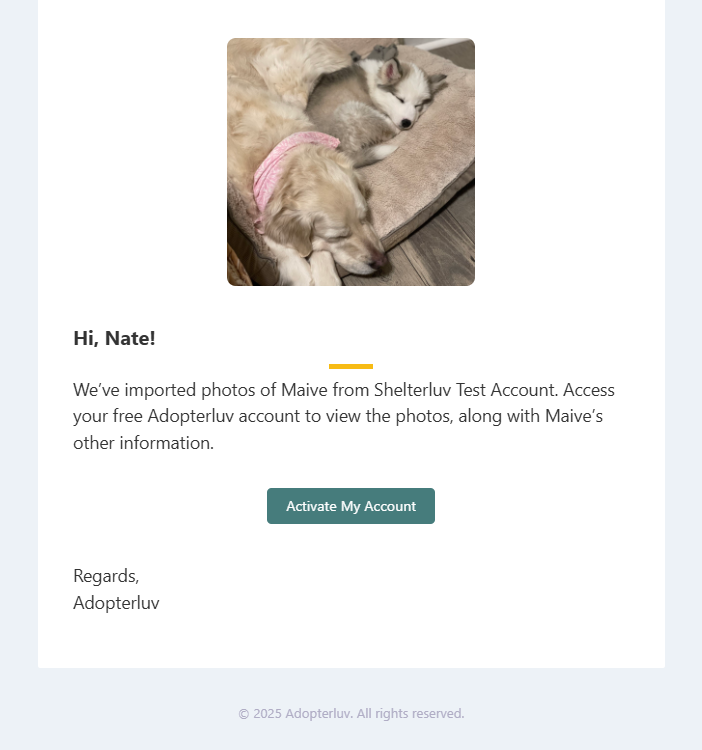
Note: If you try to log in before clicking the Activate My Account button, you may see an error that your email address is not recognized. You must complete the activation step first before you can log in.
Troubleshooting "Email Not Recognized" Errors
If you're getting an "email not recognized" error when trying to log in, try these steps:
Verify you're using the Pet Owner login page: Make sure you're logging in at https://adopterluv.com/petowners/login, not the organization login page. Using the wrong login URL will cause your email to not be recognized.
Check for typos or spaces: Carefully verify you're entering your email address exactly as registered, with no typos or extra spaces.
Verify the registered email address: Your account may be registered under a different email address than the one you're trying. Look up your pet's microchip number in Shelterluv to confirm which email address is associated with your account.
Check your spam or junk folder: If you haven't received your activation email from yourfriends@adopterluv.com, check your spam, junk, or promotions folders.
Verify your information with your shelter or organization: Contact the shelter or organization you adopted from to verify your information is correct in their system.
If you've tried these steps and still can't log in, contact Adopterluv support to have your invitation resent or to get additional assistance.